

The “Second Layer” Problem: What to Do When AI Tools Create Operational Debt
by Jordan Brinkman
Subscribe to get sharp thinking all about ResearchOps delivered straight to your email inbox. It’s free!

The ResearchOps Review is supported by User Interviews, now part of UserTesting. User Interviews makes it fast, easy, and affordable to recruit participants so you can scale research without sacrificing quality.
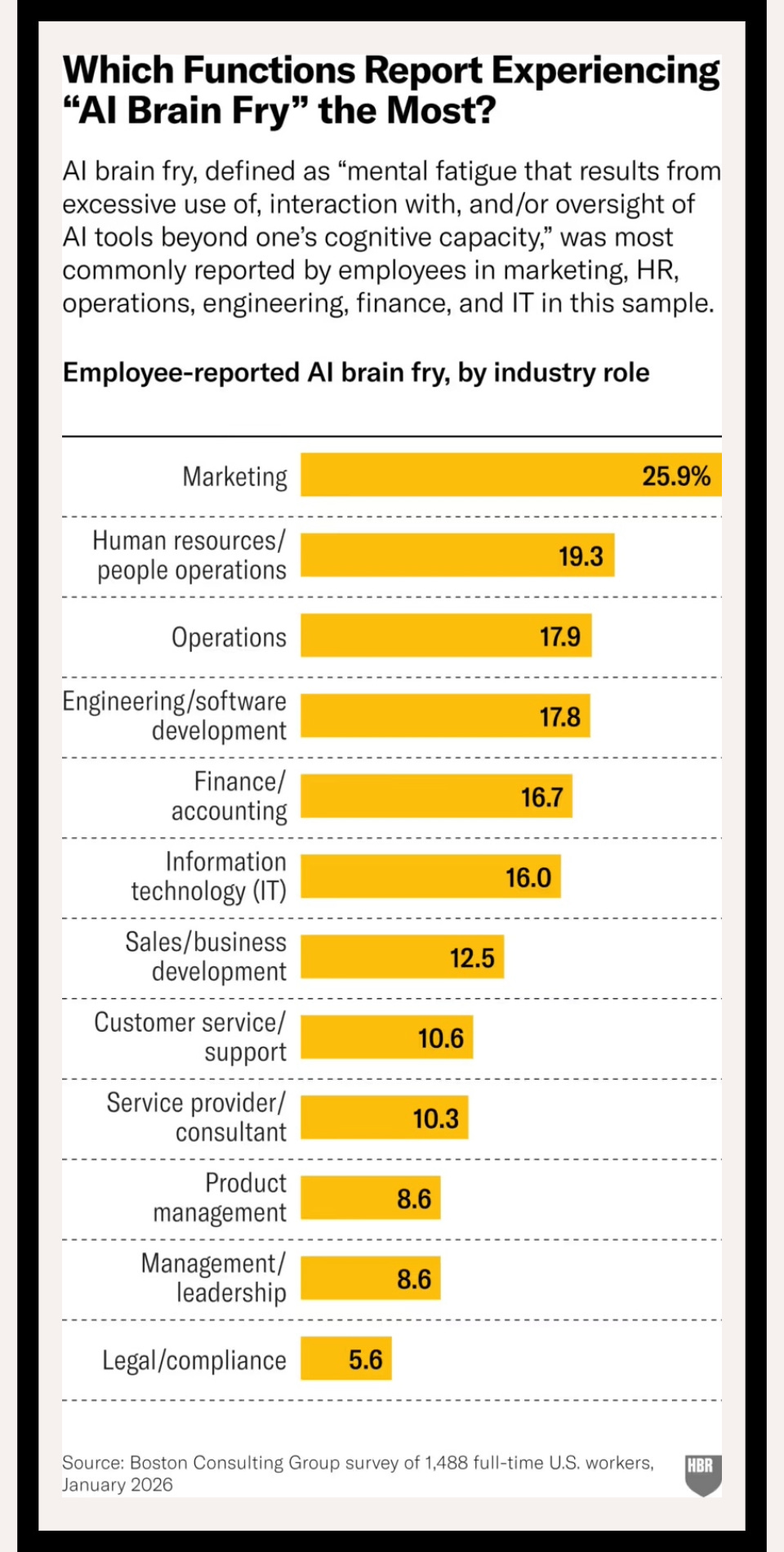
In a March 2026 Harvard Business Review article,1 which is paywalled, Julie Bedard and colleagues introduced the memorable term “AI brain fry” to describe the cognitive fatigue that can result from using AI in particular ways. They surveyed 1,488 full-time U.S.-based workers (48 percent male versus 51 percent female; 58 percent independent contributors versus 41 percent leaders) at large companies across industries and found the most taxing piece of AI usage was “oversight:” the mental burden of monitoring, editing, fact-checking, and validating AI-generated outputs. Respondents who reported high oversight demands used 14 percent more mental effort and experienced 12 percent more mental fatigue than those who reported lower AI oversight demands. They also found that the prevalence of brain fry varied by function, with marketing, human resources, and operations most affected (see Figure 1).
Shifts in the economy, layoffs, a focus on operational efficiency, and the emergence of AI mean that many researchers are now formally, or informally, delivering research operations, and they’re enthusiastically building AI systems to meet the demand. Over the past two years, I’ve been one of those researchers. Apart from the cognitive cost of overseeing those systems and their outputs—the oversight that Bedard et al described—self-built and managed AI tools produce another type of cognitive load: a “second layer” of orchestration, governance, and maintenance work; operational work that I now largely handle—work that’s mediated through prompting.
Every AI system I’ve created has helped me solve real research problems—and created new ones. I call this the second layer. Some of these challenges look like the same old research operations problems, such as figuring out who maintains the tools. As a solo researcher who now also builds AI systems, I feel the burden of the second layer more than ever. The cognitive load of building (and maintaining) AI capabilities, such as research repositories or data organizers, is different from the load of writing up a research report or producing a recruitment screener using an LLM, but they both produce brain-frying mental loads. So, what’s the solution?
With new technology and the power to build new things, I’ve come to realize that the only way forward is to answer these new questions: Who’s going to manage these newly created tools that I’m building? How should I adapt to better manage brain fry? If the list of tools I’ve built grows, and my list of maintenance to-dos grows with them, how will I ever have time to do research?
Putting a Pause on the Builder Mindset
Two years ago, I joined the insurance company ERGO NEXT Insurance as a solo UX researcher responsible for end-to-end research across the entire company, from product to marketing. Since then, I’ve used AI to create simple things like an app that mass-converts file types, and more complex systems such as a video clipping tool, a transcript-processing pipeline, and a Claude Code “living brain” that cross-references findings across more than 100 interview transcripts and other data sources. For the first time, a lack of tooling isn’t a blocker to doing research exactly as I want. If I need a survey tool, I can build my own. If I need a knowledge management system, I can make it happen. This builder mindset2 is shifting the field for research professionals, as it is for most professions. But the fact that you can build an AI tool doesn’t mean that you should, or that it will be easy to maintain, or that it will scale endlessly.
An AI Pandora’s Box
Not long ago, I used Google’s Retrieval-Augmented Generation (RAG) tool, NotebookLM, to build a research repository; since then, I’ve used Claude Code to build an even better repository. When I first presented the NotebookLM at our product offsite, stakeholders from across the company wanted immediate access, for their segment, their project, and their use case. To provide relevant content to everyone, I needed to manually review and add metadata tags to over 100 additional transcripts and add them to the NotebookLM. Normally, this process would take hours, but I quickly built an automation with the help of the AI coding tool, Cursor, and Gemini. Now, I could drag a raw transcript into a folder, where a Python script removed timestamps, standardized speaker names, removed filler words and Personally Identifiable Information (PII), and scanned the interview to add structured metadata tags: date, user segment, interviewee role, and topic keywords. (The metadata tags help the LLM find the right resources without needing to scan the entire text, which also happens to save on tokens.) Finally, the script renamed the file in a standardized format and moved it to a cleaned folder. The only thing that wasn’t automated was uploading the transcripts to the NotebookLM.
This story is important because it’s rare for one tool to handle a complete workflow on its own. Building one tool often means building other tools to make the system work, and as one technology evolves, you may want to retire one instance and all its associated tools to spin up something that’s even more powerful. The lesson is this: though AI offers the ability to build tools from a photo of a whiteboard, it’s still useful to pause and consider the primary principles of system design3—scalability, availability, reliability, latency, throughput, consistency, and fault tolerance—before you start building.
AI Multiplies Throughput (and Operational Overhead)
AI has shifted not only what research is possible but also how much research is possible, and the scale of the data I collect. For instance, research interviews—such as post-purchase and churn interviews—which were previously out of scope are now done regularly with the help of AI moderation tools. As a result, there are more interview transcripts, each of which needs to be cleaned, de-identified, tagged, and tracked before it can be added to the research repository. Of course, I built the tool that handles this cleaning process, but maintaining that system is its own job, too, and the repository can’t function fully without it.
When you build a tool, it’s essential to ask: What scale will this system need to handle: how many transcripts, queries, or recruits, for instance? What other systems will it rely on or create reliability with? How reliable does it need to be? But systems aren’t purely mechanical, so you should also consider, as always, the larger ecosystem of people and culture in which it will launch and live.
Beware of Cognitive Surrender
Once I’d rolled out access to the Google NotebookLM, stakeholders started saying things like, “We made this decision because Jordan’s NotebookLM said to.” But NotebookLM’s function is to surface research, not to make product decisions—an excellent example of Wharton researchers, Steven Shaw and Gideon Nave’s “cognitive surrender.”4 Admittedly, the outputs are good enough that it’s easy to treat them as authoritative, but as the architect of these sorts of “instant knowledge” systems, is it now my job to govern and educate people on how to use AI systems for research? It seems it is.
Building any tool should include a consideration of the cultural implications: Who will design and provide training, governance, and guardrails? How will you onboard people so they’re equipped to use the tool responsibly? How will you monitor correct usage? What is correct usage? And, importantly, how will you evaluate output?
As any AI-fluent researcher will tell you, regularly evaluating AI outputs to ensure reliability is essential (I believe that, too), but, as a solo researcher and now an AI tool builder and maintainer, I don’t have the time to design and run a full-scale evaluation (or “eval”) process every time I use a tool. Instead, I usually run ten evals on a single transcript, and if everything looks good, I’m good, too. But the lesson is: when you build an AI system, plan to design a permanent quality control loop, and plan in time to manage it. When I have the capacity, I plan to incorporate a more systematic review process using Lindsey DeWitt Prat’s five-step evaluation blueprint, which she shared in this Review article, “Winning the Game of Broken Telephone: A Blueprint for Evaluating AI Across the Research Pipeline.”5
Escalating Orchestration
Not long ago, one of my colleagues shared a tweet by Andrej Karpathy, a prominent AI researcher and founding member of OpenAI, about a concept he called an “LLM wiki.” I gave Claude Code the tweet with some explanation about what I wanted to build: a compounding knowledge system in which each new piece of content is cleaned, tagged, analyzed, summarized, and cross-referenced against everything that’s already stored in the system. I called this system the research brain. Using the research brain, I can control the methodology for how transcripts are analyzed, how research findings are cross-referenced, and how themes are surfaced. I can give the brain an outline of the business context and ask it to write up articles—and all of this information compounds over time to make the brain even more relevant.
Two years ago, building these capabilities would have required a dedicated engineering team. That I can achieve this on my own is remarkable, but building and maintaining a system of this complexity requires a lot of orchestration and detailed workflow mapping. I even drew the entire workflow on a whiteboard so Claude Code could use it to help improve it (see Figure 2). The builder is building the app, but the app is also building itself.
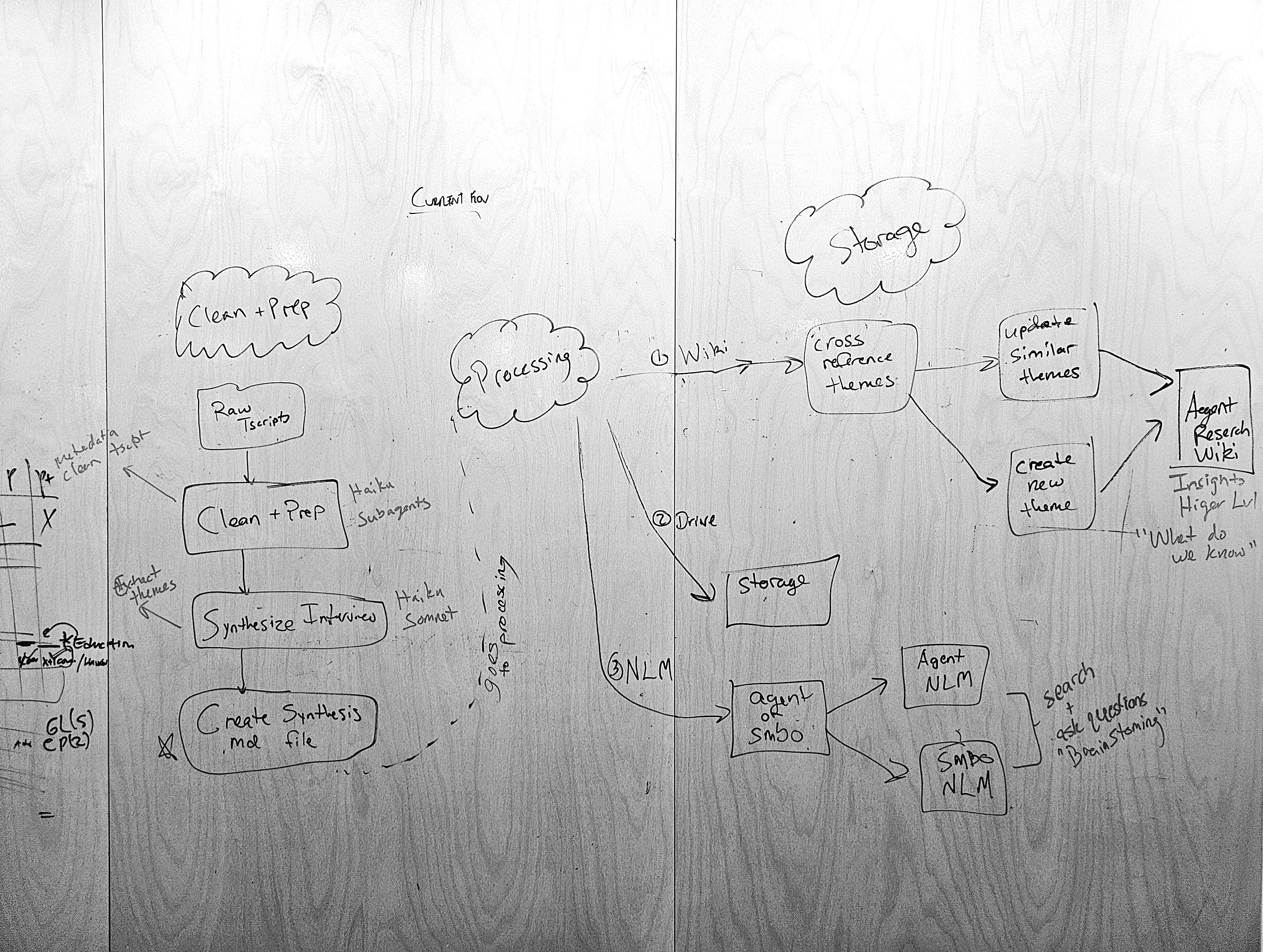
To return to the notion of AI brain fry, when you’re building or using a relatively simple tool like NotebookLM—you ask a question and get an answer with citations—the oversight expense is fairly low. If you’re building agentic systems like the “research brain,” the orchestration escalates. You’re mapping multi-step workflows, writing metadata schemas, creating Claude Skills (a Skill is a simple set of instructions that Claude can use to handle repeatable workflows) for each stage of the pipeline, testing outputs, and evaluating reliability. Managing this even for one user, never mind dozens or hundreds of people across the organization, can get so complicated that, soon enough, you’ll regularly need to document the entire workflow just to explain it to your team, and to Claude itself. In an effort to mitigate some of the brain fry, I recommend creating a Claude Skill for each step. Once you have a set of Skills, make sure each of them works independently, then string the Skills together to create a multi-step workflow. A piece-by-piece understanding of your system makes for better management than building it all at once.
Building AI Sustainably
In February 2026, Aruna Ranganathan and Xingqi Maggie Ye at UC Berkeley shared findings from an eight-month study of how employees at a 200-person tech company worked with AI. They found that AI expanded rather than reduced employees’ work because people took on more, stopped taking breaks, and kept multiple threads with AI. Read more about this work in their Harvard Business Review article, “AI Doesn’t Reduce Work—It Intensifies It.”6 To combat issues of AI brain fry and overwhelm, they recommend building in intentional pauses before major decisions, sequencing work into phases rather than reacting to every AI output, and protecting time for human connection. Why not meet with your colleagues to share what you’re working on and get feedback? I’ve also found human connection to help me slow down what I’m working on—to pause, even if for a moment.
I built all of these tools because I had problems that needed solving, but managing brain fry and the second layer is increasingly essential to maintaining operations—how I operate as part of that system, too. If you’re a research professional, lean into the builder mindset, play and experiment, stay current with AI tools, and don’t get discouraged by blockers. These tools will give you the ability to create capabilities that would have been unthinkable even two years ago. But as you adopt this new mindset, find ways to proactively manage the burnout, which sometimes means building less, slowing down to consider system design, or retiring inventions that aren’t useful.
So before you vibe a tool into existence, ask these age-old operational questions:
Will this system scale? Will it stay reliable? And what will it cost, both financially and cognitively, to maintain? In systems terms: scalability, availability, reliability, latency, throughput, consistency, and fault tolerance.
How will it jibe with the people and the culture in your organization?
What will you need to do to manage how the tool is used?
Also, plan and document. If you want to build an extensive system, create a project plan with goals, a timeline, and an approach for how you will evaluate success so that you know what you’re working towards. Document or journal your daily progress so you can reflect on and share your building process. I often build something, then discover that I’ve got no idea as to how I got there, and that’s how the second layer creeps in.
In order to address the second layer, you need to name it, and I find that regularly documenting your process helps. In addition, by creating documentation, you’ll need to manually write out the workflow you want the AI to replicate (you’ll pause and think), which will also help you explain it to the LLM more accurately. You can do this by creating visuals or a written document. If you’re working in Claude Code, you might ask it to keep a running decision and work log, recorded by date, during a building session. By having Claude maintain the decision log, you’re offloading some of that second-layer orchestration overhead onto the system itself, rather than owning it yourself. And if you’re ever unsure how to solve a problem, Claude can probably help!
Avoiding the Iteration Trap
The 2025 User Interviews State of User Research7 report found that 80 percent of UX researchers use AI to support their work, up from 56 percent in 2024. Researchers appear to be using AI more, but the same report found that sentiment is mixed. Forty-one percent of UX researchers reported feeling negatively toward AI’s impact on user research, and only 32 percent reported feeling positive. That’s a pretty big gap. These numbers confirm my sense that AI is a double-edged sword: it’s empowering, but it’s equally easy to feel forced to use it to survive—to move faster and faster still. From the same report, this quote stood out:
“AI is becoming a focus over bigger customer problems in a way I don’t love, and although it helps with lower lift tasks, I feel pressured to use it or else I’ll be left behind. It speeds up my work but at the cost of my retention and sanity and quality of output. I fear I’m losing my voice the more I use AI, but I have to use it out of necessity to get things done at the pace I’m expected to.”
When it comes to building AI systems, I keep coming back to these questions: When is something that I’ve built truly finished? When is any of it good enough? Is it ever “finished?” Like a painter in front of a canvas, it’s hard to know when to stop—when to put the brush down. Claude gets better with every iteration, and I can keep adding steps, refinements, and complexity without a clear benchmark for “done.” I’m also building as quickly as I can, which is fast. Nowadays, fast doesn’t feel fast enough. Part of the solution is to use system design thinking to more carefully consider the technical and cognitive implications of what you build—just because you can build something doesn’t mean that you should.

The ResearchOps Review is made possible by User Interviews, now part of UserTesting. With a vast participant network, precise matching, and fraud prevention, User Interviews can reliably fill any research study. Source, screen, track and pay participants, then move seamlessly from data collection to deep analysis, all in one place. → Learn more about User Interviews for ResearchOps.
Bedard, Julie, Matthew Kropp, Megan Hsu, Olivia T. Karaman, Jason Hawes, and Gabriella Rosen Kellerman. “When Using AI Leads to “Brain Fry”.” Harvard Business Review, March 5, 2026. https://hbr.org/2026/03/when-using-ai-leads-to-brain-fry.
Dixit, Pranav. “Several Meta Employees Have Started Calling Themselves ‘AI Builders’.” Business Insider https://www.businessinsider.com/meta-pms-ai-builders-tech-industry-2026-2.
Haque, Faisal. "The Complete System Design Guide: From Zero to Production-Ready." Medium. April 19, 2026. https://aws.plainenglish.io/the-complete-system-design-guide-from-zero-to-production-ready-8fa98ec35fd5.
Shaw, Steven D., and Gideon Nave. “Thinking—Fast, Slow, and Artificial: How AI Is Reshaping Human Reasoning and the Rise of Cognitive Surrender.” The Wharton School Research Paper, (2026). Accessed April 21, 2026. https://doi.org/10.31234/osf.io/yk25n_v1.
DeWitt Prat, Lindsey. "Winning the Game of Broken Telephone: A Blueprint for Evaluating AI Across the Research Pipeline." The ResearchOps Review, May 6, 2026. https://www.theresearchopsreview.com/p/a-blueprint-for-evaluating-ai-across-the-research-pipeline.
Ranganathan, Aruna, and Xingqi Maggie Ye. “AI Doesn’t Reduce Work—It Intensifies It.” The Harvard Business Review, February 9, 2026. https://hbr.org/2026/02/ai-doesnt-reduce-work-it-intensifies-it.
"The State of User Research 2025." User Interviews. September 10, 2025. https://www.userinterviews.com/state-of-user-research-report.